


はじめに
前編では、Telegramとn8nを連携し、音声・テキスト入力を処理する「親ワークフロー」の基盤を構築しました。前回の記事をまだ読んでない方はこちらからお読み下さい。
後編となる本記事では、4つの子エージェント(Email / Calendar / Contact / Content Creator)を構築し、前編で設定した親エージェント(Ultimate Assistant)と連携させます。これにより、自然言語の指示でさまざまなタスクを自動実行できるシステムを完成させましょう。
完成すると、Telegramから以下のような指示ができるようになります。
- 「今夜6時に〇〇さんとミーティングを設定して、確認メールも送って」
- 「〇〇さんからの最新メールに返信して」
- 「〇〇についてのブログを書いて、下書きメールにして」
完成イメージ
[Telegram] → 「〇〇さんにミーティングの確認メールを送って」
    ↓
[Ultimate Assistant(親エージェント)]
    ├→ Contact Agent で連絡先を取得
    ├→ Calendar Agent でイベント作成
    └→ Email Agent で確認メール送信
    ↓
[Telegram] ← 「ミーティングを設定し、確認メールを送信しました」
親エージェントがユーザーの意図を解釈し、適切な子エージェントにタスクを委譲します。複数のエージェントが連携して、1つの指示で複数のアクションを実行できます。
こんなシーンでの活用に適しています
- メールとカレンダーの操作を自然言語で行いたい
- ブログ記事の下書きを自動生成したい
- 連絡先情報を一元管理し、他のタスクと連携させたい
方法: n8nマルチエージェント構成
| 項目 | 内容 |
|---|---|
| メリット | タスク委譲により各エージェントがシンプル、拡張しやすい |
| デメリット | 初期設定が多い |
| 難易度 | ★★★★☆(中上級) |
| 特徴 | 親エージェントが判断し子エージェントに委譲 |
| 価格 | 各種API従量課金(Gmail/Calendar無料、LLM有料) |
事前準備
以下のアカウント・環境を用意してください。
- 前編で構築したワークフロー(Ultimate Personal Assistant)
- Googleアカウント(Gmail / Google Calendar用)
- Airtableアカウント
- Anthropicアカウント(Claude用)※オプション(モデルのAPI取得用。OpenAIアカウントでも代用可能)
- Tavily APIアカウント
- ワークフローJSONファイル(4つの子エージェント)
設定手順
Step 1: Gmail OAuth2の設定
Email Agentで使用するGmail APIの認証を設定します。
参考: Google Cloud ConsoleでのOAuth認証設定(プロジェクト作成、API有効化、クライアントID取得)の詳細な手順は、過去記事「n8nでGoogle OAuth認証を設定する方法」を参照してください。
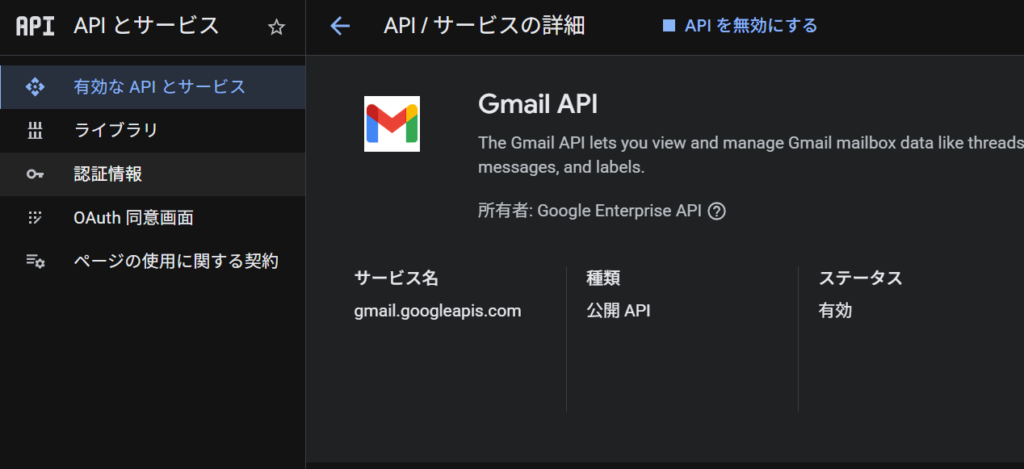
1-1. Google Cloud Consoleで「Gmail API」を有効化します。
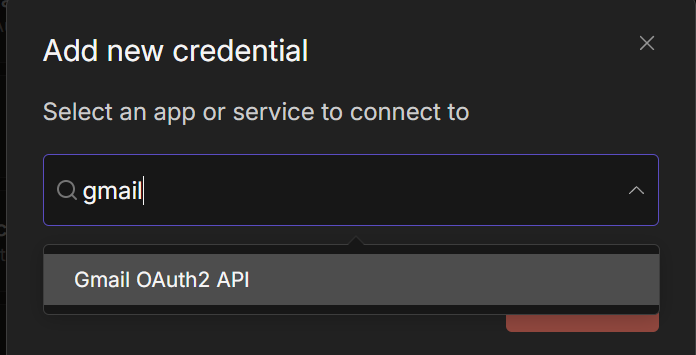
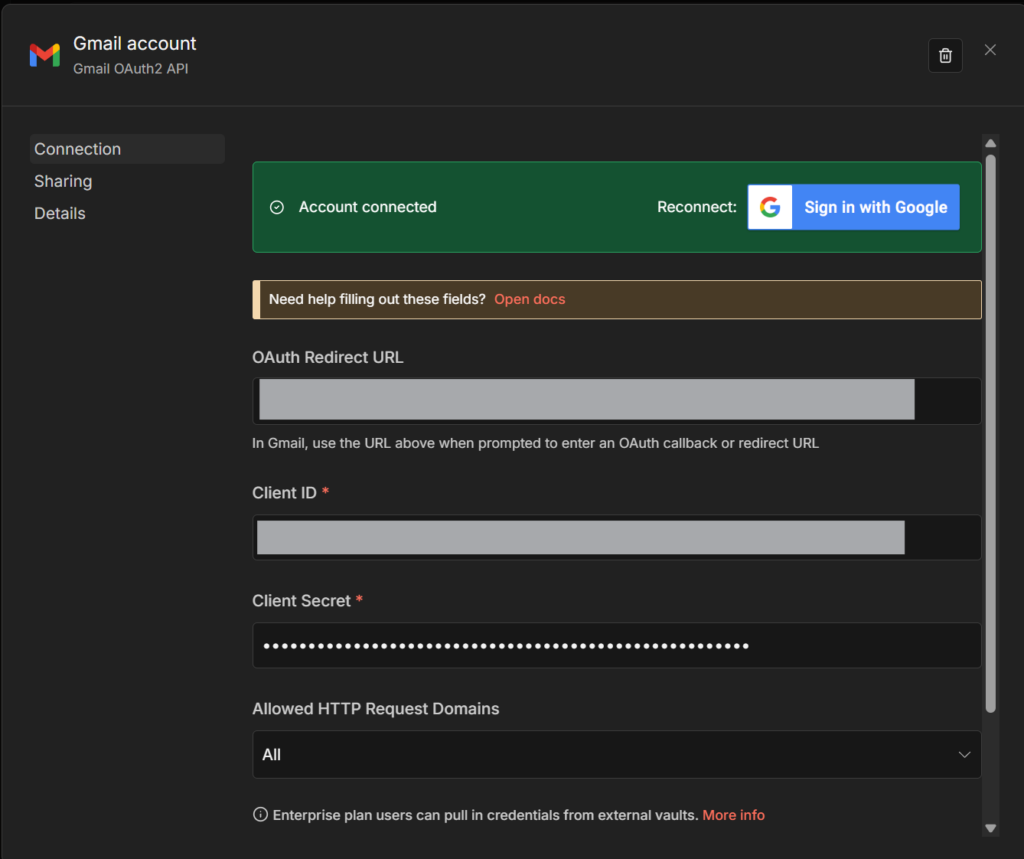
1-2. n8nで Settings → Credentials → Add Credential → Gmail OAuth2 API を選択します。
1-3. クライアントID、クライアントシークレットを入力し、Connect をクリックしてGoogleアカウントで認証します。
Step 2: Google Calendar OAuth2の設定
Calendar Agentで使用するGoogle Calendar APIの認証を設定します。
参考: Google Cloud ConsoleでのOAuth認証設定の詳細は、過去記事「n8nでGoogle OAuth認証を設定する方法」を参照してください。
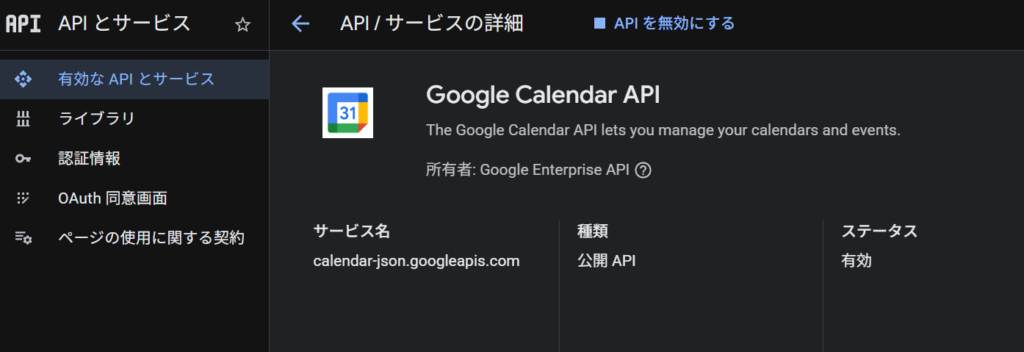
2-1. Google Cloud Consoleで、Step 1と同じプロジェクトを開き、「Google Calendar API」を有効化します。
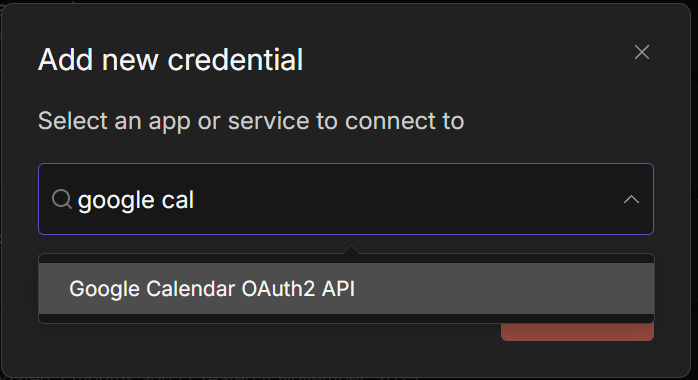
2-2. n8nで Settings → Credentials → Add Credential → Google Calendar OAuth2 API を選択します。
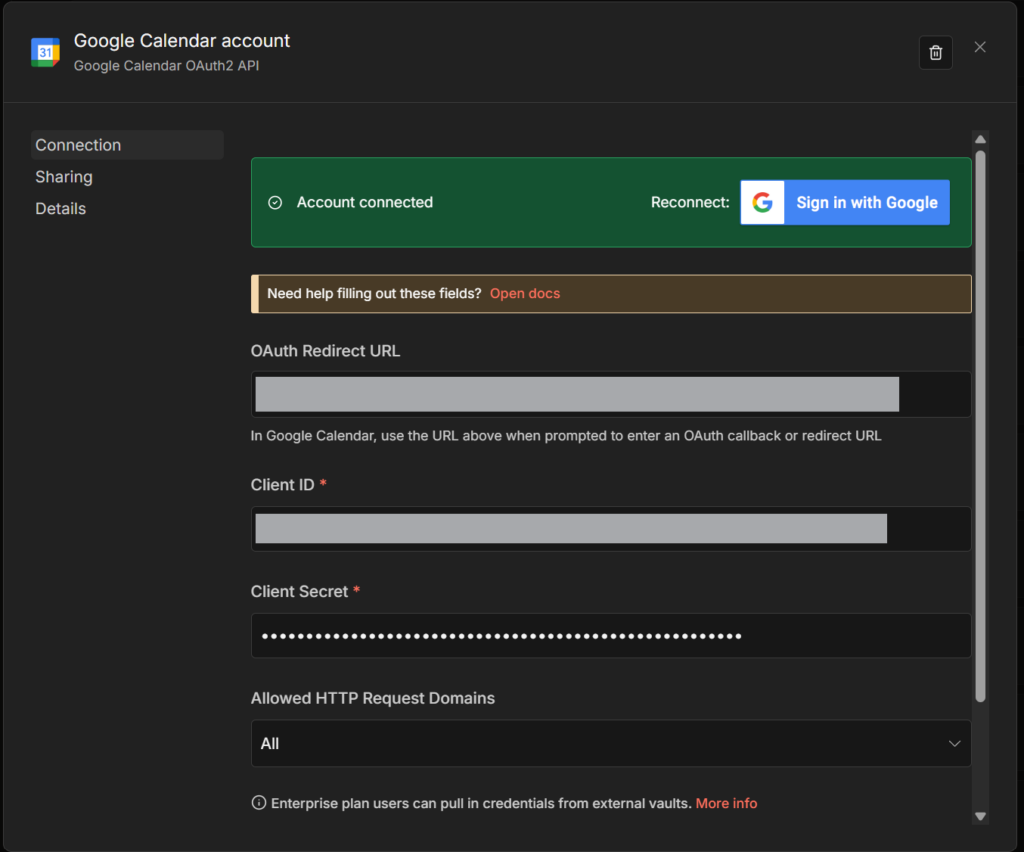
2-3. Step 1と同じクライアントID、クライアントシークレットを入力し、Connect をクリックしてGoogleアカウントで認証します。
Step 3: Airtableの設定
Contact Agentで使用する連絡先データベースを設定します。
3-1. Airtable にログインします。
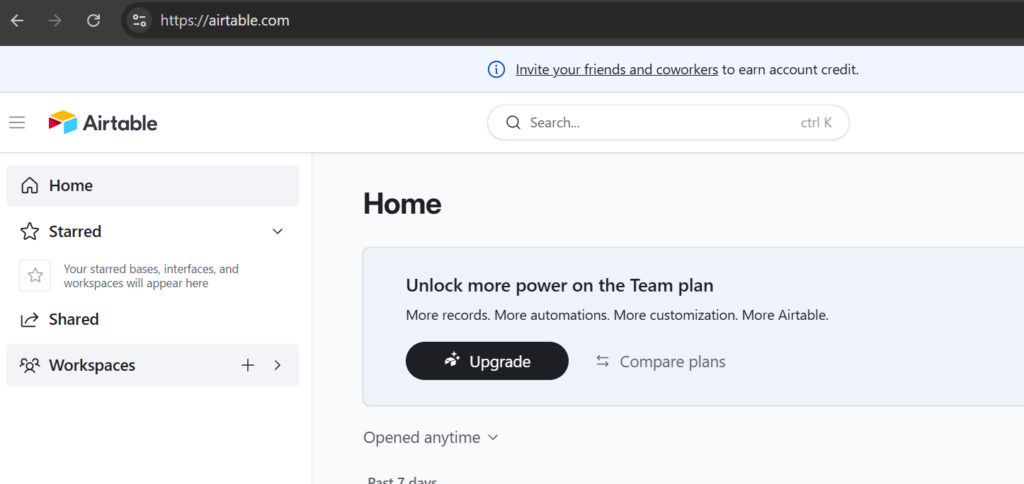
3-2. 画面左下のCreateボタンをクリック→Build an app your ownし、新しいBaseを作成し、「Contacts」という名前のテーブルを作成します。
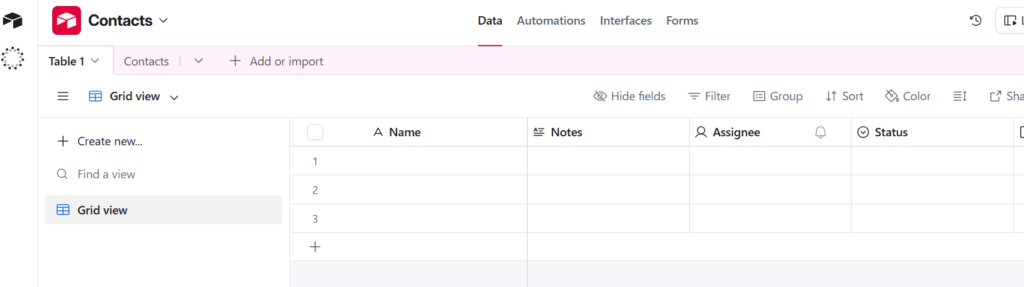
3-3. 以下のフィールドを追加します(以下はフィールド例)。
| フィールド名 | タイプ |
|---|---|
| name | Single line text |
| phoneNumber | Phone number |
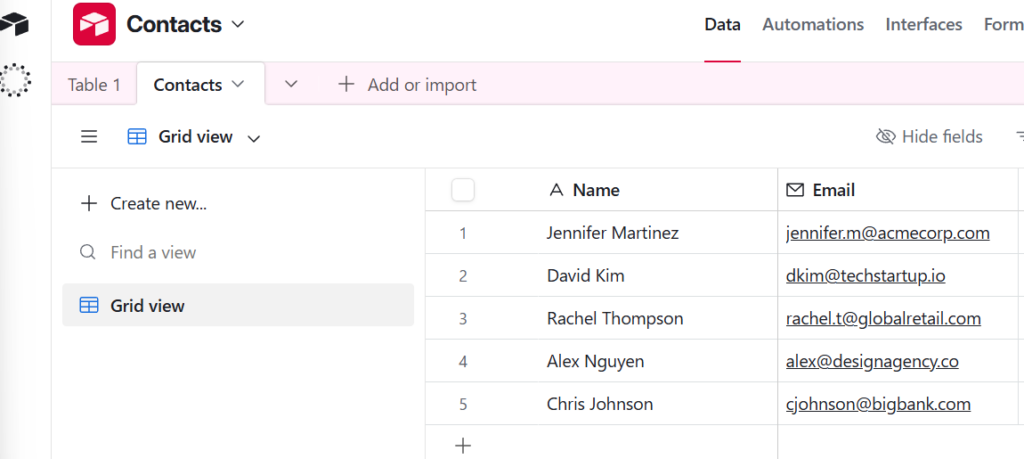
3-4. テスト用に数件の連絡先データを入力しておきます。
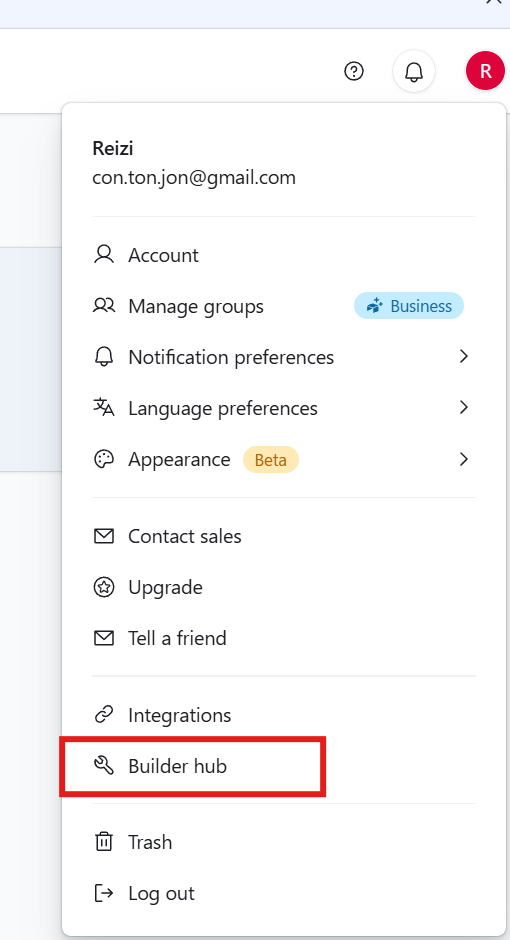
3-5. ホーム画面の右上のアカウントメニューから Builder Hub を開きます。
3-6. Personal access tokens → Create new token をクリックします。

3-7. 必要なスコープ(data.records:read、data.records:write等)を選択し、Tokenを生成します。
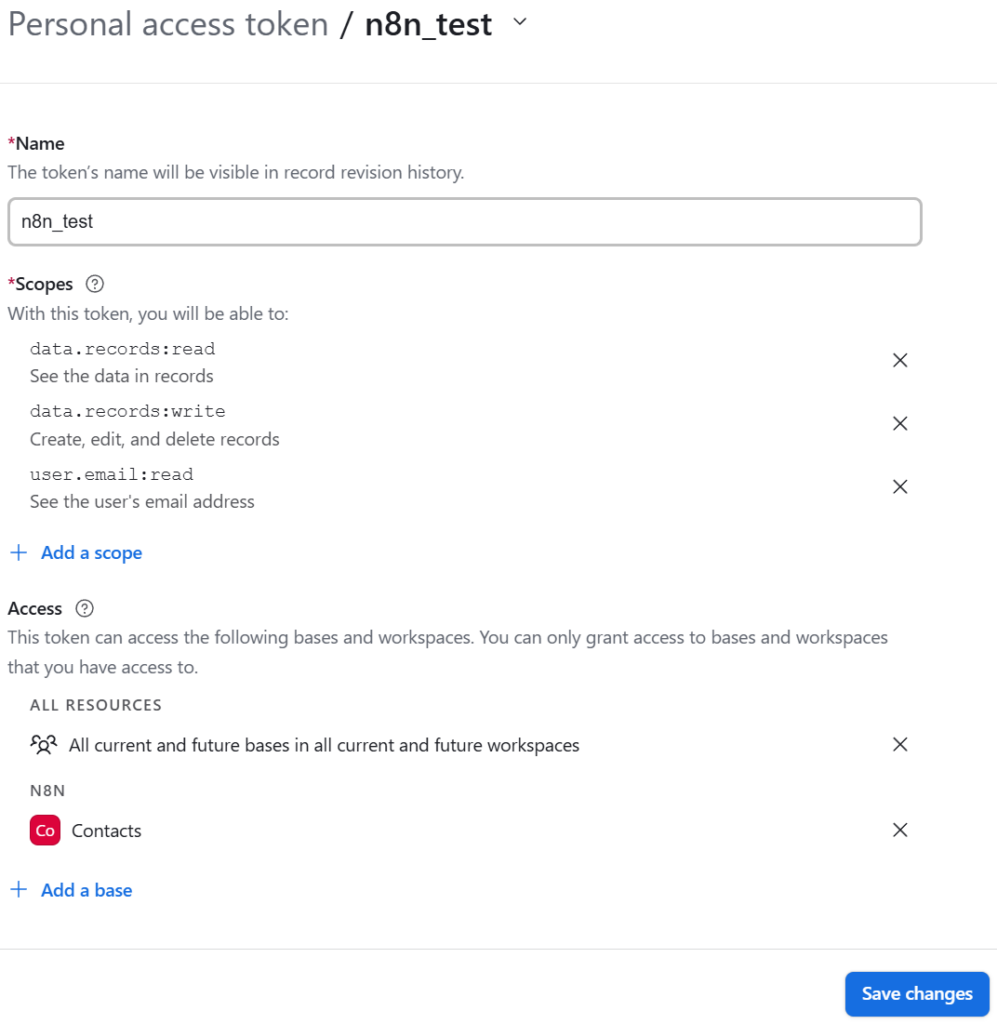
3-8. n8nで Settings → Credentials → Add Credential → Airtable Personal Access Token API を選択します。
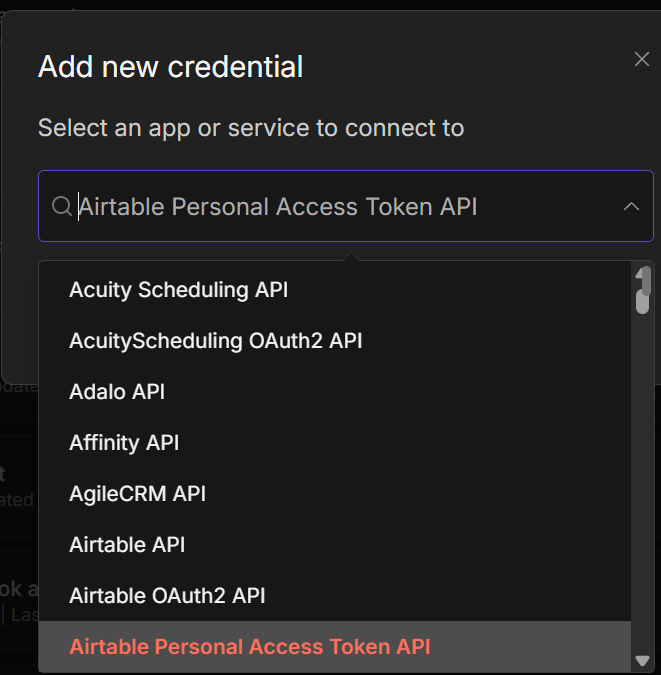
3-9. 生成したTokenを入力し、保存します。
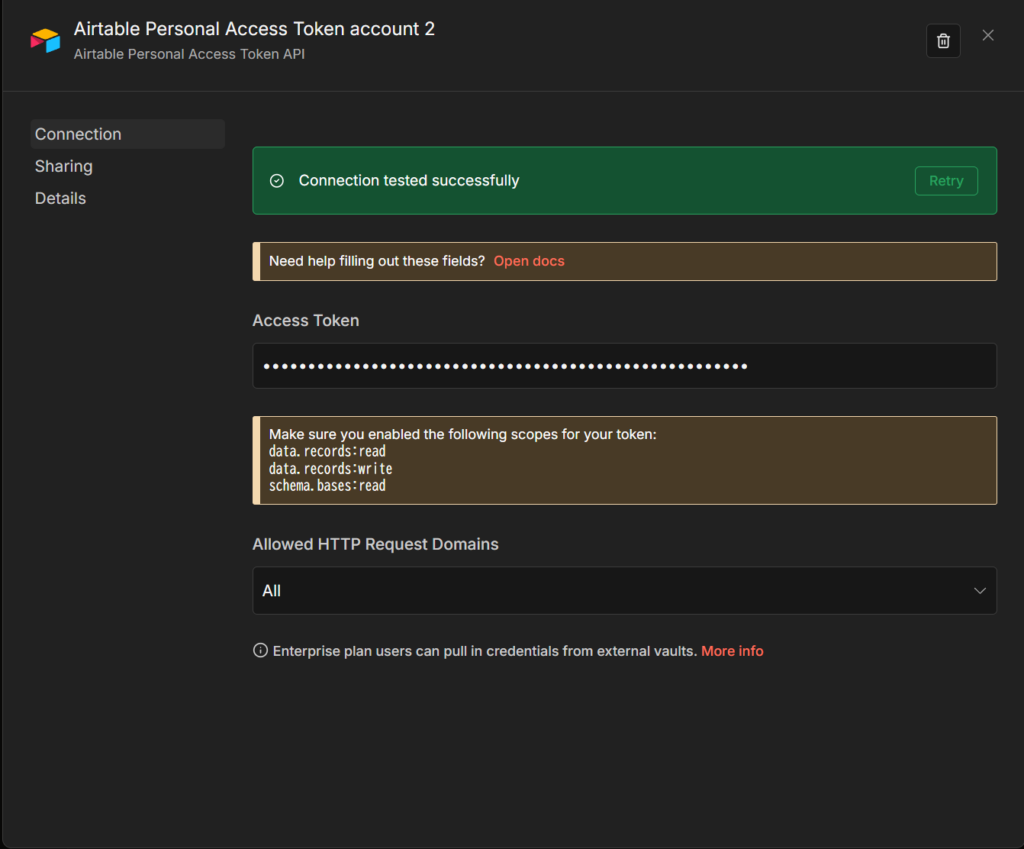
Step 4: Tavily APIの設定
Content Creator AgentとUltimate AssistantでWeb検索に使用します。
参考: Tavilyアカウントの作成とAPI Key取得の詳細な手順は、過去記事「n8nでAIニュースレターを自動生成する方法」を参照してください。
4-1. Tavily でAPI Keyを取得します。

4-2. このAPI Keyは、ワークフローJSONファイル内で直接設定します(後のステップで説明)。
Step 5: LLMモデルの設定
各エージェントで使用するLLM(大規模言語モデル)の認証を設定します。
OpenAI(親エージェント・子エージェント共通):
前編で設定済みのOpenAI認証情報を使用します(GPT用)。子エージェントでも同じ認証情報を選択してください。
Anthropic(Content Creator Agent用)※オプション:
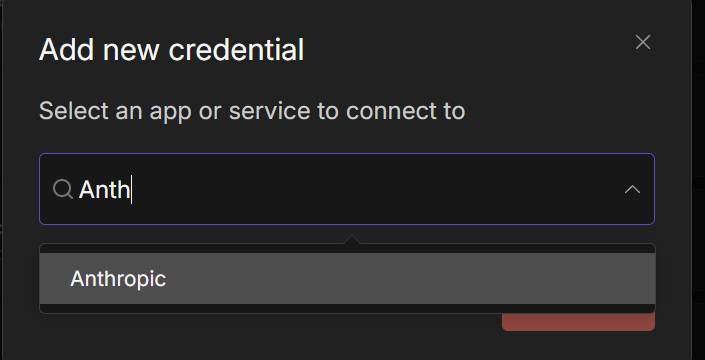
5-1. Anthropic Console にアクセスし、アカウントを作成します。
5-2. API Keyを生成します。
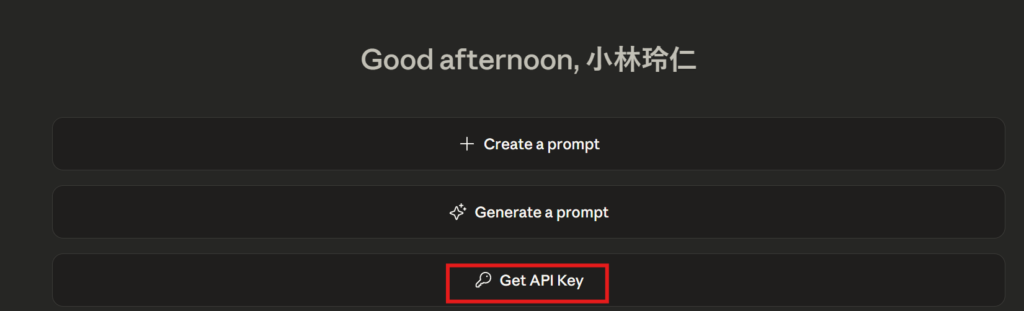
5-3. n8nで Settings → Credentials → Add Credential → Anthropic API を選択し、API Keyを入力します。
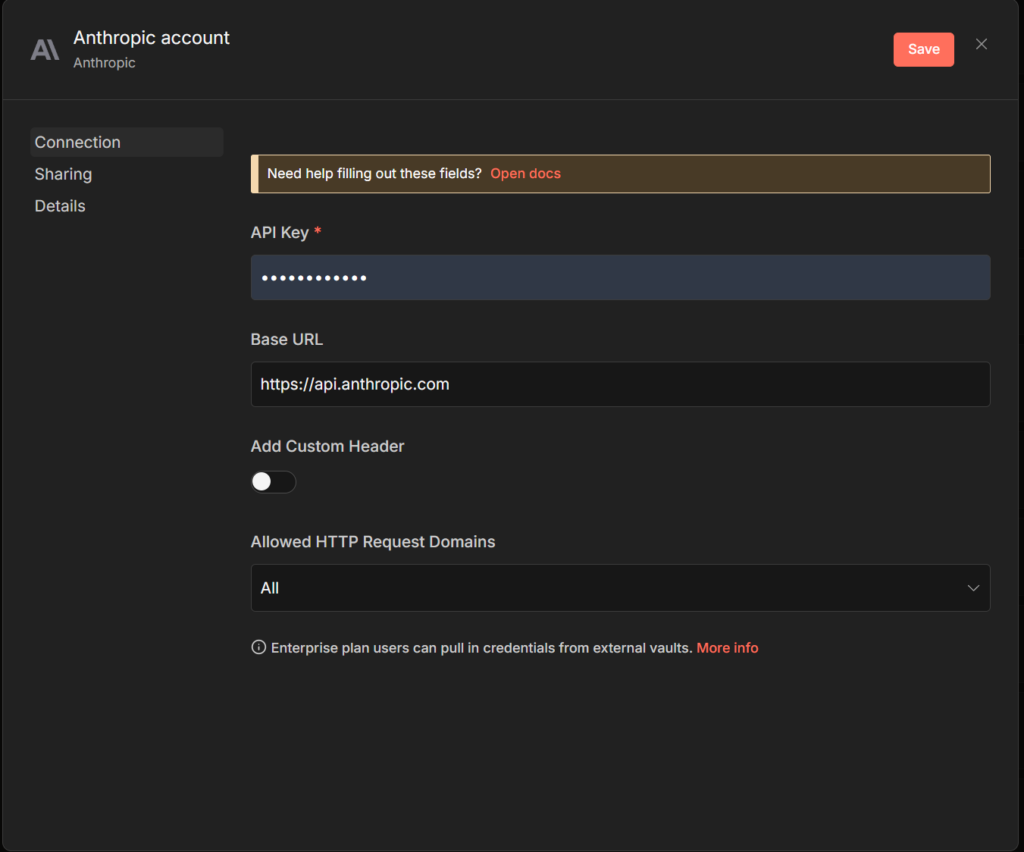
ポイント: Content Creator AgentはClaude の最新モデルを使用すると、より自然なHTML形式のブログ記事を生成できます。OpenAIのモデルでも動作します。
Step 6: 子エージェントワークフローのインポート
4つの子エージェント(Email / Calendar / Contact / Content Creator)をn8nにインポートします。
🤖Email Agent:
6-1. 以下のコードをコピーし、JSONファイル形式(.json)で保存します。
{
  "name": "🤖Email Agent",
  "nodes": [
    {
      "parameters": {
        "model": "gpt-4o",
        "options": {}
      },
      "id": "c98bcc4d-20a9-4b29-a4aa-f6b6e7bb1f1b",
      "name": "OpenAI Chat Model",
      "type": "@n8n/n8n-nodes-langchain.lmChatOpenAi",
      "typeVersion": 1,
      "position": [
        560,
        680
      ],
      "credentials": {
        "openAiApi": {
          "id": "BP9v81AwJlpYGStD",
          "name": "OpenAi account"
        }
      }
    },
    {
      "parameters": {
        "assignments": {
          "assignments": [
            {
              "id": "7ab380a2-a8d3-421c-ab4e-748ea8fb7904",
              "name": "response",
              "value": "Unable to perform task. Please try again.",
              "type": "string"
            }
          ]
        },
        "options": {}
      },
      "id": "0505c1f0-53d1-4988-843f-eb9eac2d7856",
      "name": "Try Again",
      "type": "n8n-nodes-base.set",
      "typeVersion": 3.4,
      "position": [
        1640,
        500
      ]
    },
    {
      "parameters": {
        "assignments": {
          "assignments": [
            {
              "id": "39c2f302-03be-4464-a17a-d7cc481d6d44",
              "name": "=response",
              "value": "={{$json.output}}",
              "type": "string"
            }
          ]
        },
        "options": {}
      },
      "id": "97393469-bde9-4a13-8d89-68ac6a4305db",
      "name": "Success",
      "type": "n8n-nodes-base.set",
      "typeVersion": 3.4,
      "position": [
        1640,
        320
      ]
    },
    {
      "parameters": {
        "promptType": "define",
        "text": "={{ $json.query }}",
        "options": {
          "systemMessage": "=# Overview\nYou are an email management assistant. All emails must be formatted professionally in HTML and signed off as \"Nate.\" \n\n**Email Management Tools**   \n   - Use \"Send Email\" to send emails.  \n   - Use \"Create Draft\" if the user asks for a draft.  \n   - Use \"Get Emails\" to retrieve emails when requested.\n   - Use \"Get Labels\" to retrieve labels.\n   - Use \"Mark Unread\" to mark an email as unread. You must use \"Get Emails\" first so you have the message ID of the email to flag.\n   - Use \"Label Email\" to flag an email. You must use \"Get Emails\" first so you have the message ID of the email to flag. Then you must use \"Get Labels\" so you have the label ID.\n   - Use \"Email Reply\" to reply to an email. You must use \"Get Emails\" first so you have the message ID of the email to reply to.\n\n## Final Notes\n- Here is the current date/time: {{ $now }}"
        }
      },
      "id": "0f7ba4a7-44b1-41ce-8904-9a78e8e03be4",
      "name": "Email Agent",
      "type": "@n8n/n8n-nodes-langchain.agent",
      "typeVersion": 1.6,
      "position": [
        1040,
        400
      ],
      "onError": "continueErrorOutput"
    },
    {
      "parameters": {
        "sendTo": "={{ $fromAI(\"emailAddress\") }}",
        "subject": "={{ $fromAI(\"subject\") }}",
        "message": "={{ $fromAI(\"emailBody\") }}",
        "options": {
          "appendAttribution": false
        }
      },
      "type": "n8n-nodes-base.gmailTool",
      "typeVersion": 2.1,
      "position": [
        720,
        760
      ],
      "id": "9e043f46-3e1a-431a-9495-b34e251de785",
      "name": "Send Email",
      "webhookId": "86c8c4b1-13bb-4ebe-acb9-30e1d7082d55",
      "credentials": {
        "gmailOAuth2": {
          "id": "MHutgNQIvAz7qMgP",
          "name": "Gmail account"
        }
      }
    },
    {
      "parameters": {
        "operation": "getAll",
        "limit": "={{ $fromAI(\"limit\",\"how many emails the user wants\") }}",
        "simple": false,
        "filters": {
          "sender": "={{ $fromAI(\"sender\",\"who the emails are from\") }}"
        },
        "options": {}
      },
      "type": "n8n-nodes-base.gmailTool",
      "typeVersion": 2.1,
      "position": [
        1360,
        860
      ],
      "id": "fc850981-86fa-4714-a47a-27d5ed2f4944",
      "name": "Get Emails",
      "webhookId": "af4b3298-9037-44b0-aa12-2acbfbb5e66f",
      "credentials": {
        "gmailOAuth2": {
          "id": "MHutgNQIvAz7qMgP",
          "name": "Gmail account"
        }
      }
    },
    {
      "parameters": {
        "resource": "draft",
        "subject": "={{ $fromAI(\"subject\") }}",
        "emailType": "html",
        "message": "={{ $fromAI(\"emailBody\") }}",
        "options": {
          "sendTo": "={{ $fromAI(\"emailAddress\") }}"
        }
      },
      "type": "n8n-nodes-base.gmailTool",
      "typeVersion": 2.1,
      "position": [
        1200,
        880
      ],
      "id": "c460b943-04a8-4598-9e70-be4f5d4d2303",
      "name": "Create Draft",
      "webhookId": "17016bce-d7d7-428a-a56c-f6ea122db8be",
      "credentials": {
        "gmailOAuth2": {
          "id": "MHutgNQIvAz7qMgP",
          "name": "Gmail account"
        }
      }
    },
    {
      "parameters": {
        "operation": "reply",
        "messageId": "={{ $fromAI(\"ID\",\"the message ID\") }}",
        "message": "={{ $fromAI(\"emailBody\") }}",
        "options": {
          "appendAttribution": false
        }
      },
      "type": "n8n-nodes-base.gmailTool",
      "typeVersion": 2.1,
      "position": [
        880,
        820
      ],
      "id": "500202a6-a9be-45ac-be3d-33e0928fb830",
      "name": "Email Reply",
      "webhookId": "114785e6-a859-432b-81b4-c490c1c35b1c",
      "credentials": {
        "gmailOAuth2": {
          "id": "MHutgNQIvAz7qMgP",
          "name": "Gmail account"
        }
      }
    },
    {
      "parameters": {
        "resource": "label",
        "returnAll": true
      },
      "type": "n8n-nodes-base.gmailTool",
      "typeVersion": 2.1,
      "position": [
        1480,
        800
      ],
      "id": "b05ce6a1-ae44-4d46-a32b-c6d2250794b1",
      "name": "Get Labels",
      "webhookId": "9e08b59e-792d-4566-83f1-9263c9ad86ae",
      "credentials": {
        "gmailOAuth2": {
          "id": "MHutgNQIvAz7qMgP",
          "name": "Gmail account"
        }
      }
    },
    {
      "parameters": {
        "operation": "addLabels",
        "messageId": "={{ $fromAI(\"ID\",\"the ID of the message\") }}",
        "labelIds": "={{ $fromAI(\"labelID\") }}"
      },
      "type": "n8n-nodes-base.gmailTool",
      "typeVersion": 2.1,
      "position": [
        1040,
        860
      ],
      "id": "88c2635f-5088-4f0c-b5f8-c4a5f73ffc79",
      "name": "Label Emails",
      "webhookId": "0e951529-2e6d-40bf-ac40-fc0947e242e2",
      "credentials": {
        "gmailOAuth2": {
          "id": "MHutgNQIvAz7qMgP",
          "name": "Gmail account"
        }
      }
    },
    {
      "parameters": {
        "operation": "markAsUnread",
        "messageId": "={{ $fromAI(\"messageID\") }}"
      },
      "type": "n8n-nodes-base.gmailTool",
      "typeVersion": 2.1,
      "position": [
        1620,
        740
      ],
      "id": "8f3771c3-cf3d-4481-8a6d-4ead60291649",
      "name": "Mark Unread",
      "webhookId": "a35af9d8-f67d-4ff9-803f-59ec6356e795",
      "credentials": {
        "gmailOAuth2": {
          "id": "MHutgNQIvAz7qMgP",
          "name": "Gmail account"
        }
      }
    },
    {
      "parameters": {
        "inputSource": "passthrough"
      },
      "type": "n8n-nodes-base.executeWorkflowTrigger",
      "typeVersion": 1.1,
      "position": [
        800,
        400
      ],
      "id": "053be115-2ecf-4d22-8f7f-93ad7271bf80",
      "name": "When Executed by Another Workflow"
    }
  ],
  "pinData": {},
  "connections": {
    "OpenAI Chat Model": {
      "ai_languageModel": [
        [
          {
            "node": "Email Agent",
            "type": "ai_languageModel",
            "index": 0
          }
        ]
      ]
    },
    "Email Agent": {
      "main": [
        [
          {
            "node": "Success",
            "type": "main",
            "index": 0
          }
        ],
        [
          {
            "node": "Try Again",
            "type": "main",
            "index": 0
          }
        ]
      ]
    },
    "Send Email": {
      "ai_tool": [
        [
          {
            "node": "Email Agent",
            "type": "ai_tool",
            "index": 0
          }
        ]
      ]
    },
    "Email Reply": {
      "ai_tool": [
        [
          {
            "node": "Email Agent",
            "type": "ai_tool",
            "index": 0
          }
        ]
      ]
    },
    "Get Emails": {
      "ai_tool": [
        [
          {
            "node": "Email Agent",
            "type": "ai_tool",
            "index": 0
          }
        ]
      ]
    },
    "Create Draft": {
      "ai_tool": [
        [
          {
            "node": "Email Agent",
            "type": "ai_tool",
            "index": 0
          }
        ]
      ]
    },
    "Get Labels": {
      "ai_tool": [
        [
          {
            "node": "Email Agent",
            "type": "ai_tool",
            "index": 0
          }
        ]
      ]
    },
    "Label Emails": {
      "ai_tool": [
        [
          {
            "node": "Email Agent",
            "type": "ai_tool",
            "index": 0
          }
        ]
      ]
    },
    "Mark Unread": {
      "ai_tool": [
        [
          {
            "node": "Email Agent",
            "type": "ai_tool",
            "index": 0
          }
        ]
      ]
    },
    "When Executed by Another Workflow": {
      "main": [
        [
          {
            "node": "Email Agent",
            "type": "main",
            "index": 0
          }
        ]
      ]
    }
  },
  "active": false,
  "settings": {
    "executionOrder": "v1"
  },
  "versionId": "e76750a7-4129-45a9-83ff-321a6ba6d324",
  "meta": {
    "templateCredsSetupCompleted": true,
    "instanceId": "95e5a8c2e51c83e33b232ea792bbe3f063c094c33d9806a5565cb31759e1ad39"
  },
  "id": "C3hLlOS4O6ZJtVFy",
  "tags": []
}
🤖Calendar Agent:
6-2. 以下のコードをコピーし、JSONファイル形式(.json)で保存します。
{
  "name": "🤖Calendar Agent",
  "nodes": [
    {
      "parameters": {
        "model": "gpt-4o",
        "options": {}
      },
      "id": "a34e2d84-ae30-4bfe-afa9-23dbd5dd3845",
      "name": "OpenAI Chat Model",
      "type": "@n8n/n8n-nodes-langchain.lmChatOpenAi",
      "typeVersion": 1,
      "position": [
        740,
        540
      ],
      "credentials": {
        "openAiApi": {
          "id": "BP9v81AwJlpYGStD",
          "name": "OpenAi account"
        }
      }
    },
    {
      "parameters": {
        "assignments": {
          "assignments": [
            {
              "id": "7ab380a2-a8d3-421c-ab4e-748ea8fb7904",
              "name": "response",
              "value": "Unable to perform task. Please try again.",
              "type": "string"
            }
          ]
        },
        "options": {}
      },
      "id": "ec5518af-86f7-4f41-9682-ddddc621f356",
      "name": "Try Again",
      "type": "n8n-nodes-base.set",
      "typeVersion": 3.4,
      "position": [
        1660,
        380
      ]
    },
    {
      "parameters": {
        "assignments": {
          "assignments": [
            {
              "id": "39c2f302-03be-4464-a17a-d7cc481d6d44",
              "name": "=response",
              "value": "={{$json.output}}",
              "type": "string"
            }
          ]
        },
        "options": {}
      },
      "id": "fc889778-08ca-431e-8109-7133110aa0db",
      "name": "Success",
      "type": "n8n-nodes-base.set",
      "typeVersion": 3.4,
      "position": [
        1660,
        180
      ]
    },
    {
      "parameters": {
        "promptType": "define",
        "text": "={{ $json.query }}",
        "options": {
          "systemMessage": "=# Overview\nYou are a calendar assistant. Your responsibilities include creating, getting, and deleting events in the user's calendar.\n\n**Calendar Management Tools**  \n   - Use \"Create Event with Attendee\" when an event includes a participant.  \n   - Use \"Create Event\" for solo events.   \n   - Use \"Get Events\" to fetch calendar schedules when requested.\n   - Use \"Delete Event\" to delete an event. You must use \"Get Events\" first to get the ID of the event to delete.\n   - Use \"Update Event\" to update an event. You must use \"Get Events\" first to get the ID of the event to update.\n\n## Final Notes\nHere is the current date/time: {{ $now }}\nIf a duration for an event isn't specified, assume it will be one hour."
        }
      },
      "id": "47814b5d-390b-4d4c-b6ec-578075200739",
      "name": "Calendar Agent",
      "type": "@n8n/n8n-nodes-langchain.agent",
      "typeVersion": 1.6,
      "position": [
        980,
        280
      ],
      "onError": "continueErrorOutput"
    },
    {
      "parameters": {
        "calendar": {
          "__rl": true,
          "value": "nateherk88@gmail.com",
          "mode": "list",
          "cachedResultName": "nateherk88@gmail.com"
        },
        "start": "={{ $fromAI(\"eventStart\") }}",
        "end": "={{ $fromAI(\"eventEnd\") }}",
        "additionalFields": {
          "attendees": [
            "={{ $fromAI(\"eventAttendeeEmail\") }}"
          ],
          "summary": "={{ $fromAI(\"eventTitle\") }}"
        }
      },
      "type": "n8n-nodes-base.googleCalendarTool",
      "typeVersion": 1.3,
      "position": [
        1440,
        540
      ],
      "id": "2d26c039-4756-4a86-b09c-1160b7cd6022",
      "name": "Create Event with Attendee",
      "credentials": {
        "googleCalendarOAuth2Api": {
          "id": "HYMNtkm0oglf42QP",
          "name": "Google Calendar account"
        }
      }
    },
    {
      "parameters": {
        "calendar": {
          "__rl": true,
          "value": "nateherk88@gmail.com",
          "mode": "list",
          "cachedResultName": "nateherk88@gmail.com"
        },
        "start": "={{ $fromAI(\"eventStart\") }}",
        "end": "={{ $fromAI(\"eventEnd\") }}",
        "additionalFields": {
          "attendees": [],
          "summary": "={{ $fromAI(\"eventTitle\") }}"
        }
      },
      "type": "n8n-nodes-base.googleCalendarTool",
      "typeVersion": 1.3,
      "position": [
        1300,
        640
      ],
      "id": "8bd1e7c7-98a0-4cc1-96e3-cfd2107475a9",
      "name": "Create Event",
      "credentials": {
        "googleCalendarOAuth2Api": {
          "id": "HYMNtkm0oglf42QP",
          "name": "Google Calendar account"
        }
      }
    },
    {
      "parameters": {
        "operation": "getAll",
        "calendar": {
          "__rl": true,
          "value": "nateherk88@gmail.com",
          "mode": "list",
          "cachedResultName": "nateherk88@gmail.com"
        },
        "timeMin": "={{ $fromAI(\"dayBefore\",\"the day before the date the user requested\") }}",
        "timeMax": "={{ $fromAI(\"dayAfter\",\"the day after the date the user requested\") }}",
        "options": {}
      },
      "type": "n8n-nodes-base.googleCalendarTool",
      "typeVersion": 1.3,
      "position": [
        1160,
        680
      ],
      "id": "b148f124-e2b4-4e47-8053-45d03d77ff6e",
      "name": "Get Events",
      "credentials": {
        "googleCalendarOAuth2Api": {
          "id": "HYMNtkm0oglf42QP",
          "name": "Google Calendar account"
        }
      }
    },
    {
      "parameters": {
        "operation": "delete",
        "calendar": {
          "__rl": true,
          "value": "nateherk88@gmail.com",
          "mode": "list",
          "cachedResultName": "nateherk88@gmail.com"
        },
        "eventId": "={{ $fromAI(\"eventID\") }}",
        "options": {}
      },
      "type": "n8n-nodes-base.googleCalendarTool",
      "typeVersion": 1.3,
      "position": [
        1020,
        660
      ],
      "id": "923acc0e-85b5-44e6-a063-f1642f5108b3",
      "name": "Delete Event",
      "credentials": {
        "googleCalendarOAuth2Api": {
          "id": "HYMNtkm0oglf42QP",
          "name": "Google Calendar account"
        }
      }
    },
    {
      "parameters": {
        "operation": "update",
        "calendar": {
          "__rl": true,
          "value": "nateherk88@gmail.com",
          "mode": "list",
          "cachedResultName": "nateherk88@gmail.com"
        },
        "eventId": "={{ $fromAI(\"eventID\") }}",
        "updateFields": {
          "end": "={{ $fromAI(\"endTime\") }}",
          "start": "={{ $fromAI(\"startTime\") }}"
        }
      },
      "type": "n8n-nodes-base.googleCalendarTool",
      "typeVersion": 1.3,
      "position": [
        880,
        620
      ],
      "id": "41941ae4-9cc7-4c96-8e4f-957804fc8be2",
      "name": "Update Event",
      "credentials": {
        "googleCalendarOAuth2Api": {
          "id": "HYMNtkm0oglf42QP",
          "name": "Google Calendar account"
        }
      }
    },
    {
      "parameters": {
        "inputSource": "passthrough"
      },
      "type": "n8n-nodes-base.executeWorkflowTrigger",
      "typeVersion": 1.1,
      "position": [
        740,
        280
      ],
      "id": "8abc645d-345e-4113-966d-0d3373f4141b",
      "name": "When Executed by Another Workflow"
    }
  ],
  "pinData": {},
  "connections": {
    "OpenAI Chat Model": {
      "ai_languageModel": [
        [
          {
            "node": "Calendar Agent",
            "type": "ai_languageModel",
            "index": 0
          }
        ]
      ]
    },
    "Calendar Agent": {
      "main": [
        [
          {
            "node": "Success",
            "type": "main",
            "index": 0
          }
        ],
        [
          {
            "node": "Try Again",
            "type": "main",
            "index": 0
          }
        ]
      ]
    },
    "Create Event with Attendee": {
      "ai_tool": [
        [
          {
            "node": "Calendar Agent",
            "type": "ai_tool",
            "index": 0
          }
        ]
      ]
    },
    "Create Event": {
      "ai_tool": [
        [
          {
            "node": "Calendar Agent",
            "type": "ai_tool",
            "index": 0
          }
        ]
      ]
    },
    "Get Events": {
      "ai_tool": [
        [
          {
            "node": "Calendar Agent",
            "type": "ai_tool",
            "index": 0
          }
        ]
      ]
    },
    "Delete Event": {
      "ai_tool": [
        [
          {
            "node": "Calendar Agent",
            "type": "ai_tool",
            "index": 0
          }
        ]
      ]
    },
    "Update Event": {
      "ai_tool": [
        [
          {
            "node": "Calendar Agent",
            "type": "ai_tool",
            "index": 0
          }
        ]
      ]
    },
    "When Executed by Another Workflow": {
      "main": [
        [
          {
            "node": "Calendar Agent",
            "type": "main",
            "index": 0
          }
        ]
      ]
    }
  },
  "active": false,
  "settings": {
    "executionOrder": "v1"
  },
  "versionId": "64d1923c-64fc-4d17-b776-cf0528ac9366",
  "meta": {
    "templateCredsSetupCompleted": true,
    "instanceId": "95e5a8c2e51c83e33b232ea792bbe3f063c094c33d9806a5565cb31759e1ad39"
  },
  "id": "0NtlJ41IozGhtFa6",
  "tags": []
}
🤖Contact Agent:
6-3. 以下のコードをコピーし、JSONファイル形式(.json)で保存します。
{
  "name": "🤖Contact Agent",
  "nodes": [
    {
      "parameters": {
        "model": {
          "__rl": true,
          "value": "gpt-4o",
          "mode": "list",
          "cachedResultName": "gpt-4o"
        },
        "options": {}
      },
      "type": "@n8n/n8n-nodes-langchain.lmChatOpenAi",
      "typeVersion": 1.2,
      "position": [
        -140,
        140
      ],
      "id": "789b640d-a981-43a1-ae88-9dbbd4de92c0",
      "name": "OpenAI Chat Model",
      "credentials": {
        "openAiApi": {
          "id": "BP9v81AwJlpYGStD",
          "name": "OpenAi account"
        }
      }
    },
    {
      "parameters": {
        "operation": "search",
        "base": {
          "__rl": true,
          "value": "appK0rbtvf9e7vt6w",
          "mode": "list",
          "cachedResultName": "Contacts",
          "cachedResultUrl": "https://airtable.com/appK0rbtvf9e7vt6w"
        },
        "table": {
          "__rl": true,
          "value": "tbl08JGCfUK1RhXsG",
          "mode": "list",
          "cachedResultName": "Contacts",
          "cachedResultUrl": "https://airtable.com/appK0rbtvf9e7vt6w/tbl08JGCfUK1RhXsG"
        },
        "options": {}
      },
      "type": "n8n-nodes-base.airtableTool",
      "typeVersion": 2.1,
      "position": [
        40,
        140
      ],
      "id": "6b3489a8-75be-461b-a4e4-9592a23a138f",
      "name": "Get Contacts",
      "credentials": {
        "airtableTokenApi": {
          "id": "UlAGE0msyITVkoCN",
          "name": "Nate Airtable"
        }
      }
    },
    {
      "parameters": {
        "operation": "upsert",
        "base": {
          "__rl": true,
          "value": "appK0rbtvf9e7vt6w",
          "mode": "list",
          "cachedResultName": "Contacts",
          "cachedResultUrl": "https://airtable.com/appK0rbtvf9e7vt6w"
        },
        "table": {
          "__rl": true,
          "value": "tbl08JGCfUK1RhXsG",
          "mode": "list",
          "cachedResultName": "Contacts",
          "cachedResultUrl": "https://airtable.com/appK0rbtvf9e7vt6w/tbl08JGCfUK1RhXsG"
        },
        "columns": {
          "mappingMode": "defineBelow",
          "value": {
            "name": "={{ $fromAI(\"name\") }}",
            "email": "={{ $fromAI(\"emailAddress\") }}",
            "phoneNumber": "={{ $fromAI(\"phoneNumber\") }}"
          },
          "matchingColumns": [
            "name"
          ],
          "schema": [
            {
              "id": "name",
              "displayName": "name",
              "required": false,
              "defaultMatch": false,
              "canBeUsedToMatch": true,
              "display": true,
              "type": "string",
              "readOnly": false,
              "removed": false
            },
            {
              "id": "email",
              "displayName": "email",
              "required": false,
              "defaultMatch": false,
              "canBeUsedToMatch": true,
              "display": true,
              "type": "string",
              "readOnly": false,
              "removed": false
            },
            {
              "id": "phoneNumber",
              "displayName": "phoneNumber",
              "required": false,
              "defaultMatch": false,
              "canBeUsedToMatch": true,
              "display": true,
              "type": "string",
              "readOnly": false,
              "removed": false
            }
          ],
          "attemptToConvertTypes": false,
          "convertFieldsToString": false
        },
        "options": {}
      },
      "type": "n8n-nodes-base.airtableTool",
      "typeVersion": 2.1,
      "position": [
        200,
        140
      ],
      "id": "a0eb4ad0-4e60-41bd-8854-ad20942453a4",
      "name": "Add or Update Contact",
      "credentials": {
        "airtableTokenApi": {
          "id": "UlAGE0msyITVkoCN",
          "name": "Nate Airtable"
        }
      }
    },
    {
      "parameters": {
        "promptType": "define",
        "text": "={{ $json.query }}",
        "options": {
          "systemMessage": "=# Overview\nYou are a contact management assistant. Your responsibilities include looking up contacts, adding new contacts, or updating a contact's information.\n\n**Contact Management**  \n   - Use \"Get Contacts\" to retrieve contact information. \n   - Use \"Add or Update Contact\" to store new contact information or modify existing entries. "
        }
      },
      "type": "@n8n/n8n-nodes-langchain.agent",
      "typeVersion": 1.7,
      "position": [
        -20,
        -80
      ],
      "id": "a3b9dae0-1458-4cb1-b17c-9349d41c03b5",
      "name": "Contact Agent",
      "onError": "continueErrorOutput"
    },
    {
      "parameters": {
        "assignments": {
          "assignments": [
            {
              "id": "4f360190-a717-4a93-8336-d03ea65975d5",
              "name": "response",
              "value": "={{ $json.output }}",
              "type": "string"
            }
          ]
        },
        "options": {}
      },
      "type": "n8n-nodes-base.set",
      "typeVersion": 3.4,
      "position": [
        500,
        -160
      ],
      "id": "c33b944e-cb4f-447b-ad1f-5e199ed078ac",
      "name": "Response"
    },
    {
      "parameters": {
        "assignments": {
          "assignments": [
            {
              "id": "4f360190-a717-4a93-8336-d03ea65975d5",
              "name": "response",
              "value": "An error occurred. Please try again.",
              "type": "string"
            }
          ]
        },
        "options": {}
      },
      "type": "n8n-nodes-base.set",
      "typeVersion": 3.4,
      "position": [
        500,
        20
      ],
      "id": "2df9e0c0-3f4f-4a06-a36f-f552fe99e2b8",
      "name": "Try Again"
    },
    {
      "parameters": {
        "inputSource": "passthrough"
      },
      "type": "n8n-nodes-base.executeWorkflowTrigger",
      "typeVersion": 1.1,
      "position": [
        -240,
        -80
      ],
      "id": "ca88c05c-5a68-4a88-b15b-22398fb15d86",
      "name": "When Executed by Another Workflow"
    }
  ],
  "pinData": {},
  "connections": {
    "OpenAI Chat Model": {
      "ai_languageModel": [
        [
          {
            "node": "Contact Agent",
            "type": "ai_languageModel",
            "index": 0
          }
        ]
      ]
    },
    "Get Contacts": {
      "ai_tool": [
        [
          {
            "node": "Contact Agent",
            "type": "ai_tool",
            "index": 0
          }
        ]
      ]
    },
    "Add or Update Contact": {
      "ai_tool": [
        [
          {
            "node": "Contact Agent",
            "type": "ai_tool",
            "index": 0
          }
        ]
      ]
    },
    "Contact Agent": {
      "main": [
        [
          {
            "node": "Response",
            "type": "main",
            "index": 0
          }
        ],
        [
          {
            "node": "Try Again",
            "type": "main",
            "index": 0
          }
        ]
      ]
    },
    "When Executed by Another Workflow": {
      "main": [
        [
          {
            "node": "Contact Agent",
            "type": "main",
            "index": 0
          }
        ]
      ]
    }
  },
  "active": false,
  "settings": {
    "executionOrder": "v1"
  },
  "versionId": "24f13596-516c-4365-b91d-e477ed1c652b",
  "meta": {
    "templateCredsSetupCompleted": true,
    "instanceId": "95e5a8c2e51c83e33b232ea792bbe3f063c094c33d9806a5565cb31759e1ad39"
  },
  "id": "IsSUyrla7wc1cDLE",
  "tags": []
}
🤖Content Creator Agent:
6-4. 以下のコードをコピーし、JSONファイル形式(.json)で保存します。
{
  "name": "🤖Content Creator Agent",
  "nodes": [
    {
      "parameters": {
        "toolDescription": "Use this tool to search the internet",
        "method": "POST",
        "url": "https://api.tavily.com/search",
        "sendBody": true,
        "specifyBody": "json",
        "jsonBody": "{\n    \"api_key\": \"your-api-key\",\n    \"query\": \"{searchTerm}\",\n    \"search_depth\": \"basic\",\n    \"include_answer\": true,\n    \"topic\": \"news\",\n    \"include_raw_content\": true,\n    \"max_results\": 3\n} ",
        "placeholderDefinitions": {
          "values": [
            {
              "name": "searchTerm",
              "description": "What the user has requested to write a blog about",
              "type": "string"
            }
          ]
        }
      },
      "type": "@n8n/n8n-nodes-langchain.toolHttpRequest",
      "typeVersion": 1.1,
      "position": [
        240,
        180
      ],
      "id": "0fb22922-121d-4f1c-8423-77c3cb7893ce",
      "name": "Tavily"
    },
    {
      "parameters": {
        "promptType": "define",
        "text": "={{ $json.query}}",
        "options": {
          "systemMessage": "=# Overview\nYou are a skilled AI blog writer specializing in engaging, well-structured, and informative content. Your writing style is clear, compelling, and tailored to the target audience. You optimize for readability, SEO, and value, ensuring blogs are well-researched, original, and free of fluff.\n\n## Tools\nTavily - Use this to search the web about the requested topic for the blog post.\n\n## Blog Requirements\nFormat all blog content in HTML, using proper headings (<h1>, <h2>), paragraphs (<p>), bullet points (<ul><li>), and links (<a href=\"URL\">) for citations. All citations from the Tavily tool must be preserved, with clickable hyperlinks so readers can access the original sources.\n\nMaintain a natural, human-like tone, use varied sentence structures, and include relevant examples or data when needed. Structure content for easy reading with concise paragraphs and logical flow. Always ensure factual accuracy and align the tone with the intended brand or purpose."
        }
      },
      "type": "@n8n/n8n-nodes-langchain.agent",
      "typeVersion": 1.7,
      "position": [
        120,
        -100
      ],
      "id": "585eaf6a-3f7b-4a85-973e-fd78806ba230",
      "name": "Content Creator Agent",
      "onError": "continueErrorOutput"
    },
    {
      "parameters": {
        "options": {}
      },
      "type": "@n8n/n8n-nodes-langchain.lmChatAnthropic",
      "typeVersion": 1.2,
      "position": [
        -40,
        140
      ],
      "id": "0ad7fbd5-5317-4979-9688-d99bc3a3fad2",
      "name": "Anthropic Chat Model",
      "credentials": {
        "anthropicApi": {
          "id": "iEsH2oywXIJiWHnM",
          "name": "Anthropic account"
        }
      }
    },
    {
      "parameters": {
        "assignments": {
          "assignments": [
            {
              "id": "14d9076e-27ea-4846-8b44-f83cf4022b9e",
              "name": "response",
              "value": "={{ $json.output }}",
              "type": "string"
            }
          ]
        },
        "options": {}
      },
      "type": "n8n-nodes-base.set",
      "typeVersion": 3.4,
      "position": [
        560,
        -180
      ],
      "id": "ec1997eb-6a99-488b-b496-8355df6c003c",
      "name": "Response"
    },
    {
      "parameters": {
        "assignments": {
          "assignments": [
            {
              "id": "f2a8ff2d-6b59-4ad6-a2e7-8705354f4105",
              "name": "response",
              "value": "Error occurred. Please try again.",
              "type": "string"
            }
          ]
        },
        "options": {}
      },
      "type": "n8n-nodes-base.set",
      "typeVersion": 3.4,
      "position": [
        560,
        0
      ],
      "id": "0cf971a0-cd9f-4bcf-b020-4839fd3a3708",
      "name": "Try Again"
    },
    {
      "parameters": {
        "inputSource": "passthrough"
      },
      "type": "n8n-nodes-base.executeWorkflowTrigger",
      "typeVersion": 1.1,
      "position": [
        -140,
        -100
      ],
      "id": "9ad2ac76-7c2b-40ca-9bf2-9c30ac8d132b",
      "name": "When Executed by Another Workflow"
    }
  ],
  "pinData": {},
  "connections": {
    "Tavily": {
      "ai_tool": [
        [
          {
            "node": "Content Creator Agent",
            "type": "ai_tool",
            "index": 0
          }
        ]
      ]
    },
    "Anthropic Chat Model": {
      "ai_languageModel": [
        [
          {
            "node": "Content Creator Agent",
            "type": "ai_languageModel",
            "index": 0
          }
        ]
      ]
    },
    "Content Creator Agent": {
      "main": [
        [
          {
            "node": "Response",
            "type": "main",
            "index": 0
          }
        ],
        [
          {
            "node": "Try Again",
            "type": "main",
            "index": 0
          }
        ]
      ]
    },
    "When Executed by Another Workflow": {
      "main": [
        [
          {
            "node": "Content Creator Agent",
            "type": "main",
            "index": 0
          }
        ]
      ]
    }
  },
  "active": false,
  "settings": {
    "executionOrder": "v1"
  },
  "versionId": "18d27333-3b4c-4fe7-a85d-bbc7000820cf",
  "meta": {
    "templateCredsSetupCompleted": true,
    "instanceId": "95e5a8c2e51c83e33b232ea792bbe3f063c094c33d9806a5565cb31759e1ad39"
  },
  "id": "WWSu94V939ATcqvi",
  "tags": []
}インポート手順:
6-5. n8nで Workflows → Import from File をクリックします。
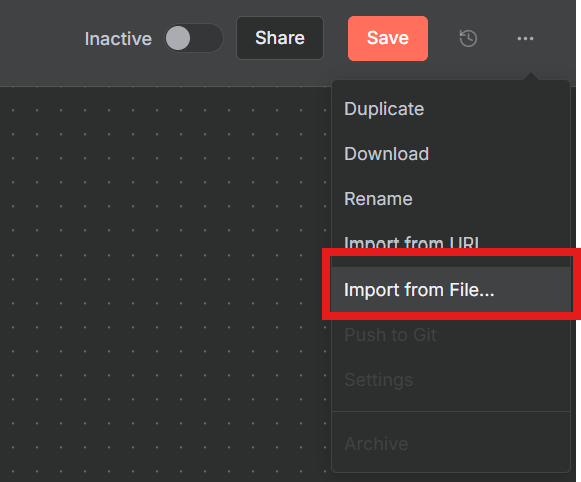
6-6. 保存した4つのJSONファイルを順番にインポートします。
6-7. 各ワークフローを開き、保存します(ワークフローIDが確定します)。
Step 7: Email Agentの設定
メール操作を担当するエージェントを設定します。
認証情報の設定:
7-1. 🤖Email Agent ワークフローを開きます。
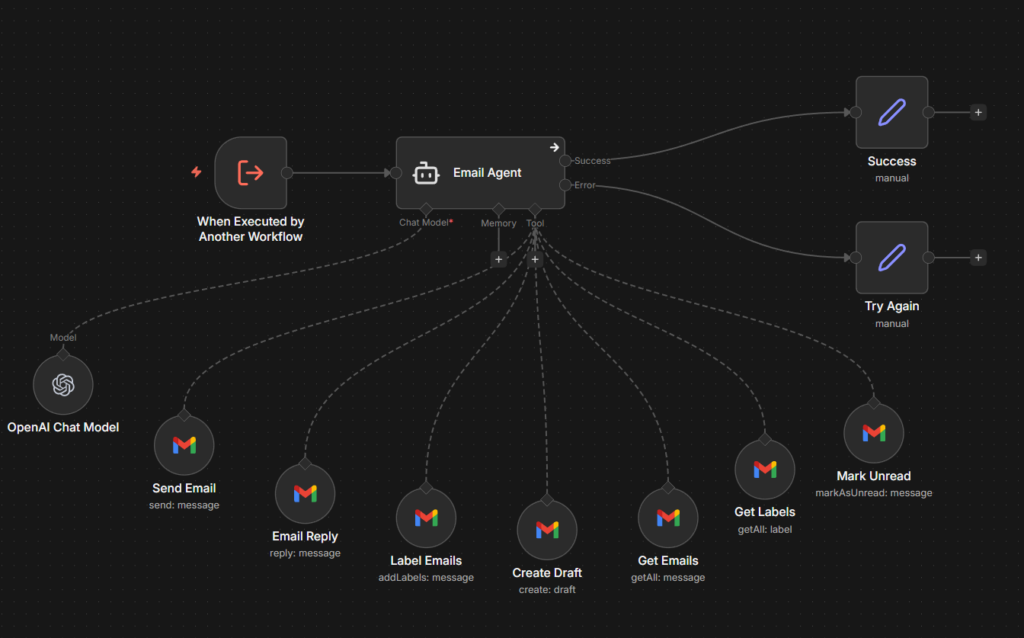
7-2. OpenAI Chat Model ノードを開き、Step 5で設定したOpenAI認証情報を選択します。
7-3. 以下のGmailノードすべてに、Step 1で設定したGmail OAuth2認証情報を設定します。
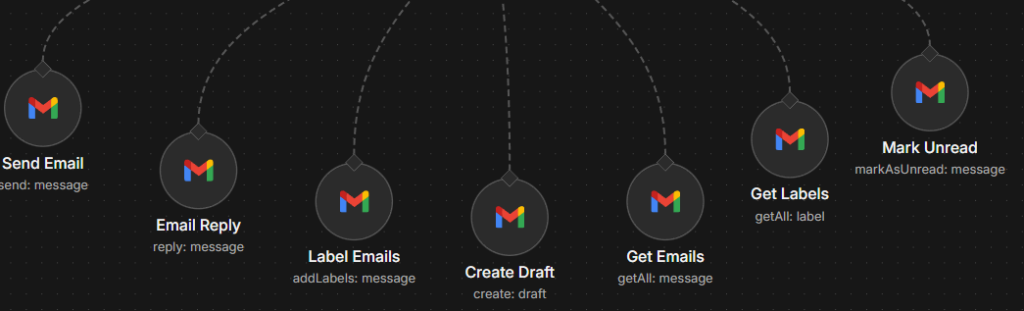
Send EmailGet EmailsCreate DraftEmail ReplyGet LabelsLabel EmailsMark Unread
システムプロンプトの確認:
7-4. Email Agent ノードを開き、システムプロンプトを確認します。
# Overview
You are an email management assistant. All emails must be formatted
professionally in HTML and signed off as "your name."カスタマイズ: 署名を自分の名前に変更する場合は、「your name」の部分を修正してください。
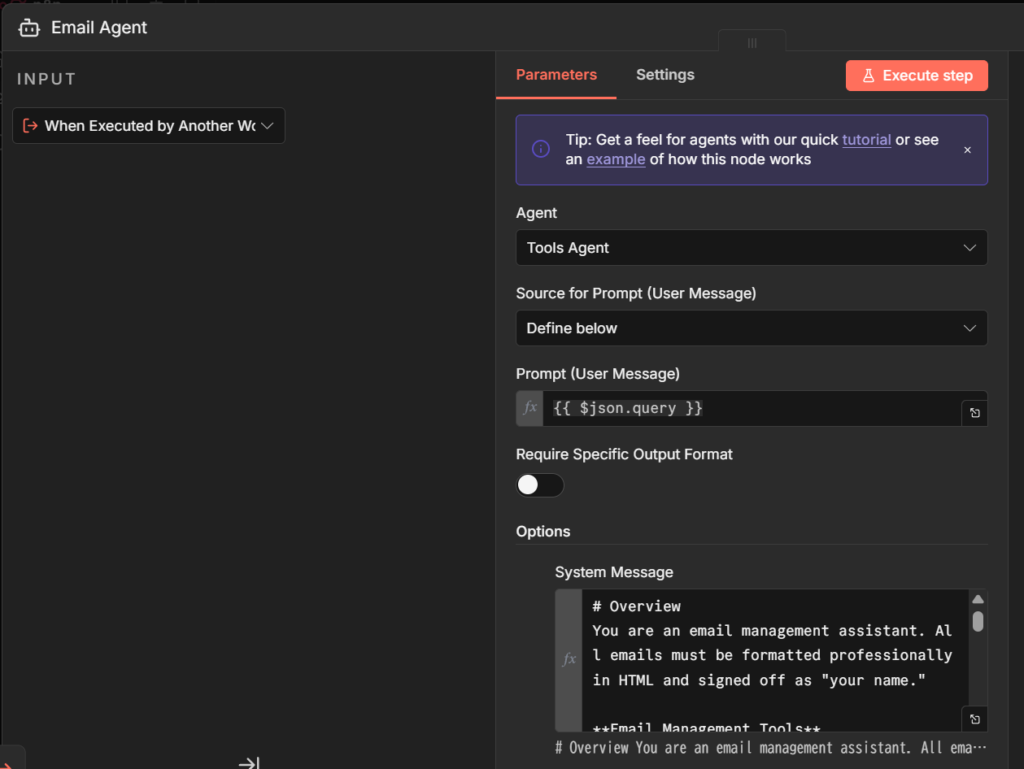
利用可能なツール:
| ツール名 | 機能 |
|---|---|
| Send Email | メール送信 |
| Create Draft | 下書き作成 |
| Get Emails | メール取得 |
| Get Labels | ラベル一覧取得 |
| Mark Unread | 未読にする |
| Label Email | ラベル付け |
| Email Reply | 返信(同一スレッド) |
7-5. ワークフローを保存した後、公開(Publish)します。公開(Publish)しないと、親エージェントから子エージェントを呼び出した際に、情報が更新されていないので注意してください。
Step 8: Calendar Agentの設定
カレンダー操作を担当するエージェントを設定します。
認証情報の設定:
8-1. 🤖Calendar Agent ワークフローを開きます。
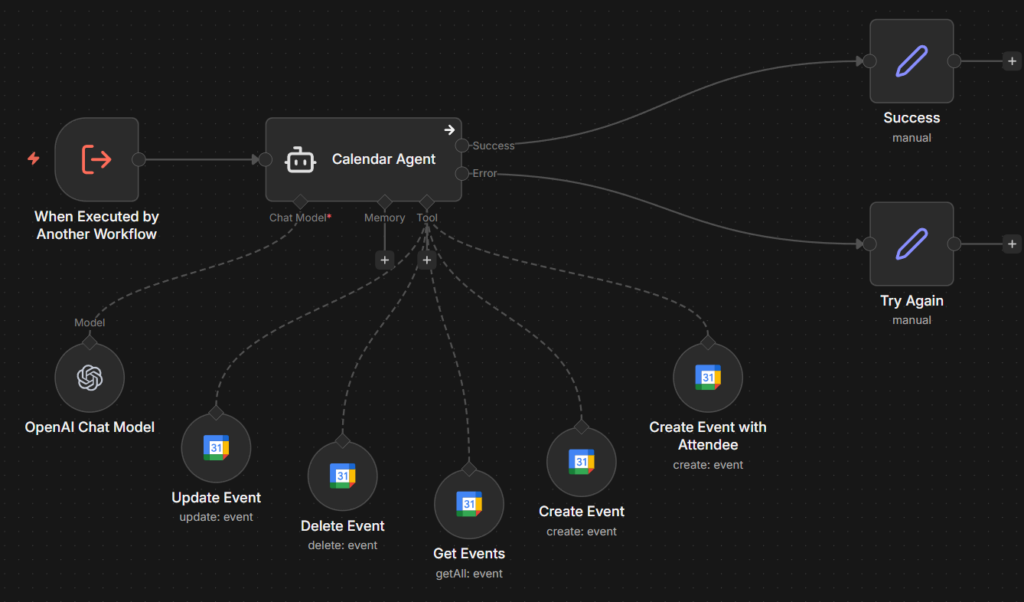
8-2. OpenAI Chat Model ノードにOpenAI認証情報を設定します。
8-3. 以下のGoogle Calendarノードすべてに、Step 2で設定したGoogle Calendar OAuth2認証情報を設定します。
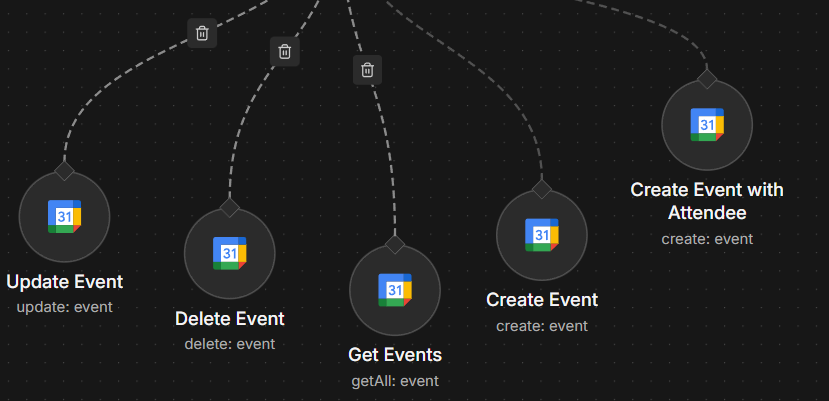
Create EventCreate Event with AttendeeGet EventsDelete EventUpdate Event
カレンダーIDの設定:
8-4. 各Google Calendarノードで、Calendar パラメータに自分のカレンダーID(通常はGmailアドレス)を設定します。
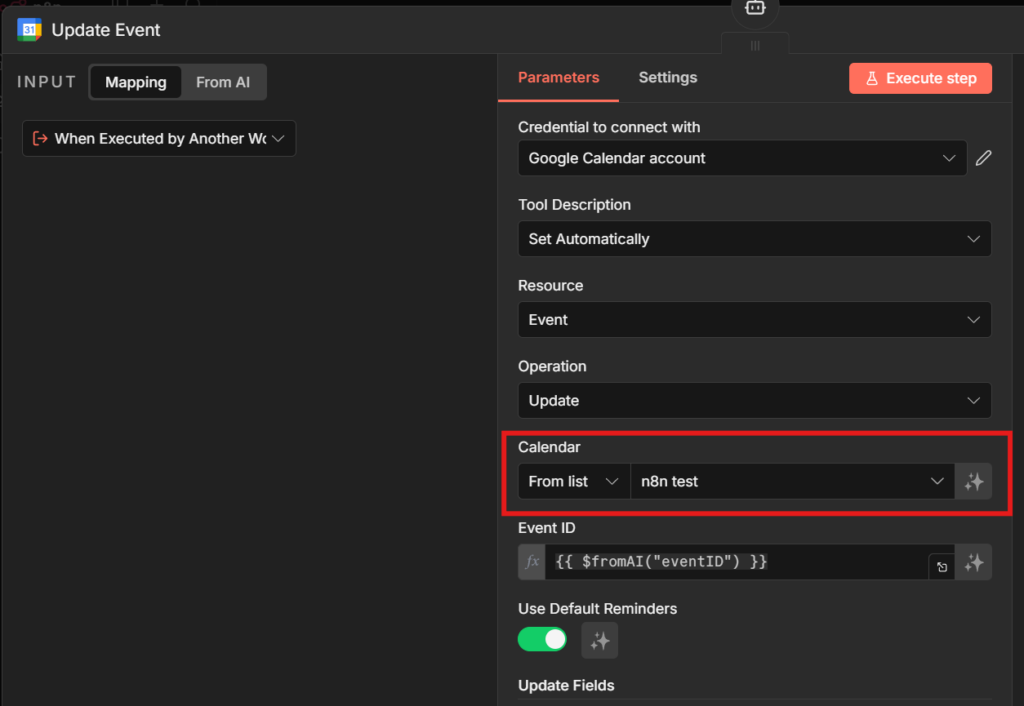
システムプロンプトの確認:
8-5. Calendar Agent ノードを開き、システムプロンプトを確認します。
# Overview
You are a calendar assistant. Your responsibilities include creating,
getting, and deleting events in the user's calendar.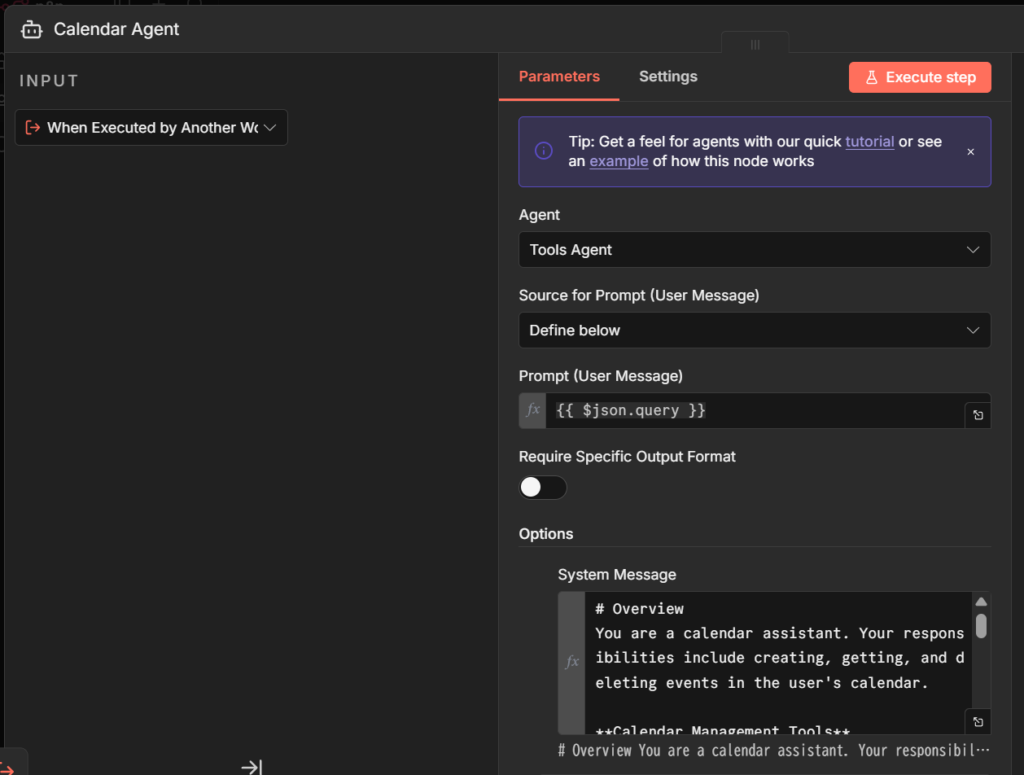
8-6. ワークフローを保存した後、公開(Publish)します。公開(Publish)しないと、親エージェントから子エージェントを呼び出した際に、情報が更新されていないので注意してください。
Step 9: Contact Agentの設定
連絡先管理を担当するエージェントを設定します。
認証情報の設定:
9-1. 🤖Contact Agent ワークフローを開きます。
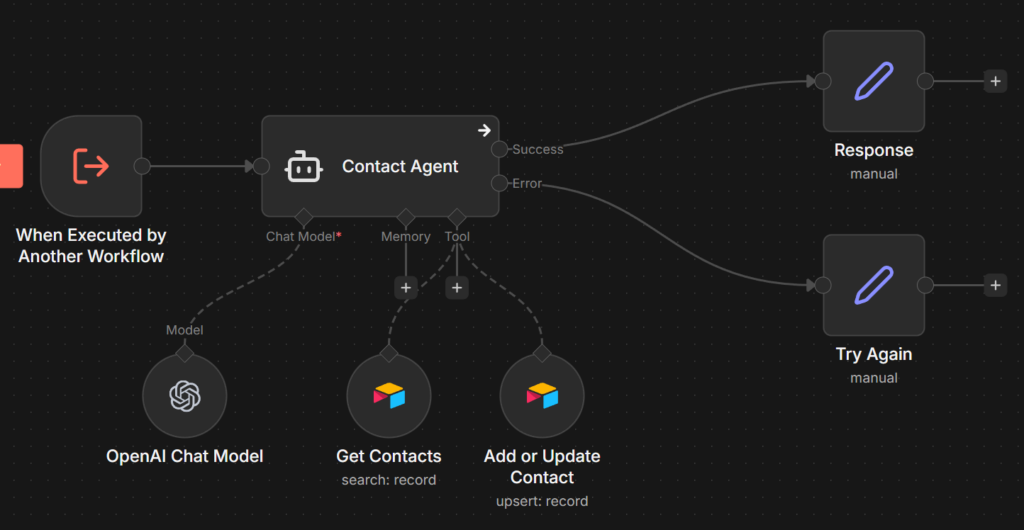
9-2. OpenAI Chat Model ノードにOpenAI認証情報を設定します。
9-3. 以下のAirtableノードに、Step 3で設定したAirtable認証情報を設定します。
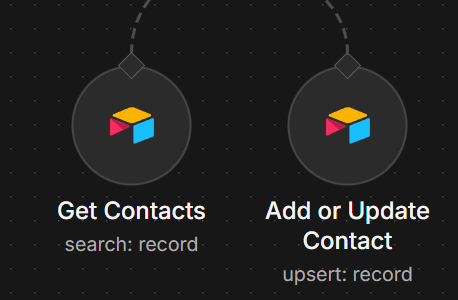
Get ContactsAdd or Update Contact
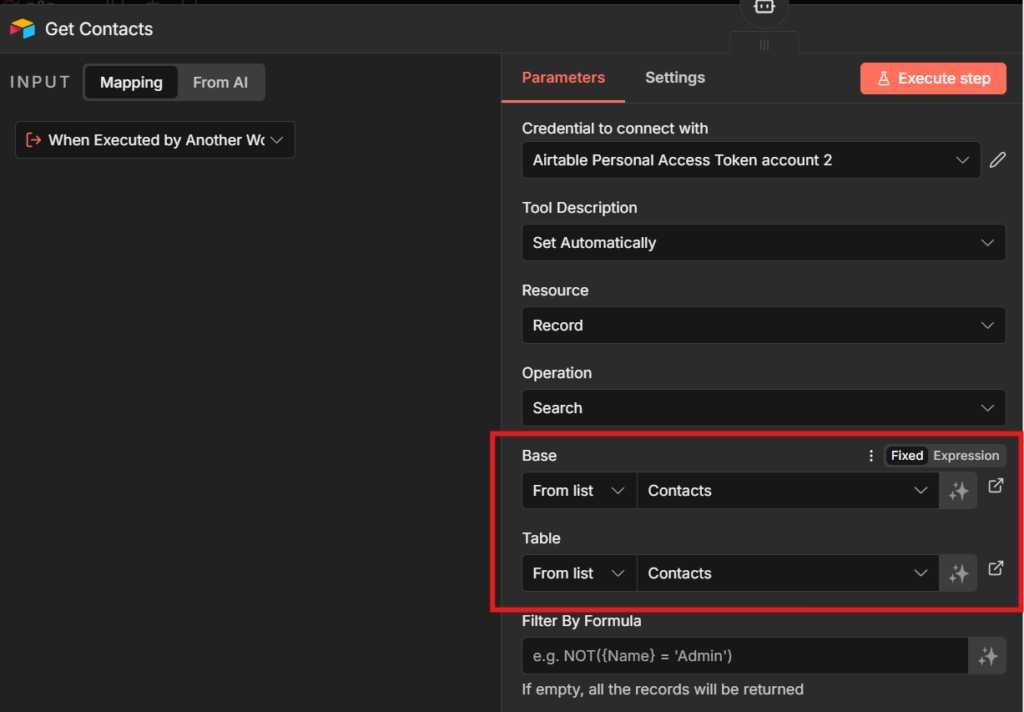
Base/Tableの設定:
9-4. 各Airtableノードで、Base と Table パラメータにStep 3で作成したBaseとTableを選択します。
システムプロンプトの確認:
9-5. Contact Agent ノードを開き、システムプロンプトを確認します。
# Overview
You are a contact management assistant. Your responsibilities include
looking up contacts, adding new contacts, or updating a contact's information.
9-6. ワークフローを保存した後、公開(Publish)します。公開(Publish)しないと、親エージェントから子エージェントを呼び出した際に、情報が更新されていないので注意してください。
Step 10: Content Creator Agentの設定
ブログ記事生成を担当するエージェントを設定します。
認証情報の設定:
10-1. 🤖Content Creator Agent ワークフローを開きます。
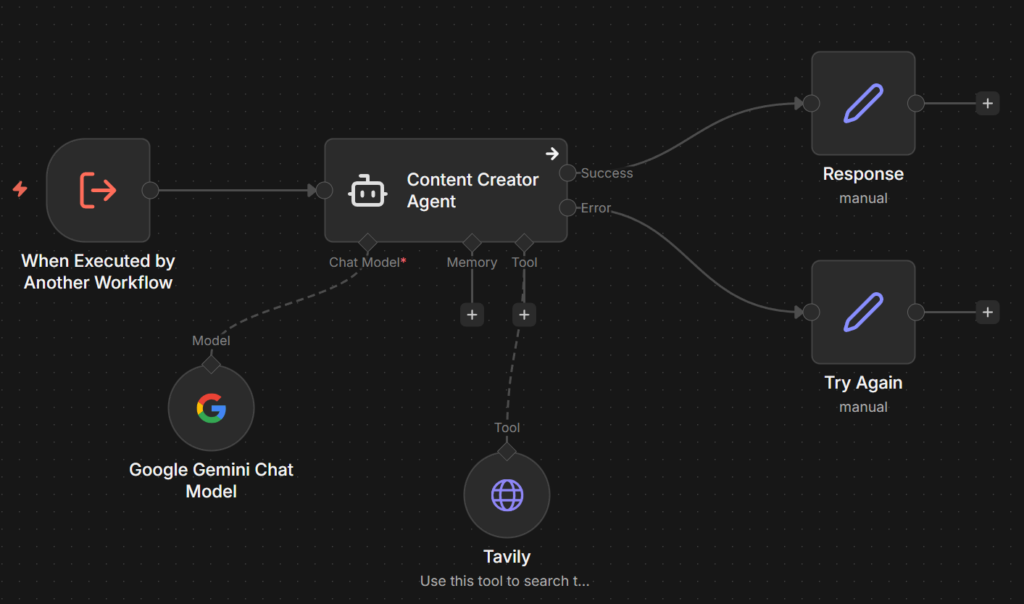
10-2. Anthropic Chat Model ノードにAnthropic認証情報を設定します(またはGoogle Gemini Chat Modelを使用)。
Tavily API Keyの設定:
10-3. Tavily ノードを開きます。
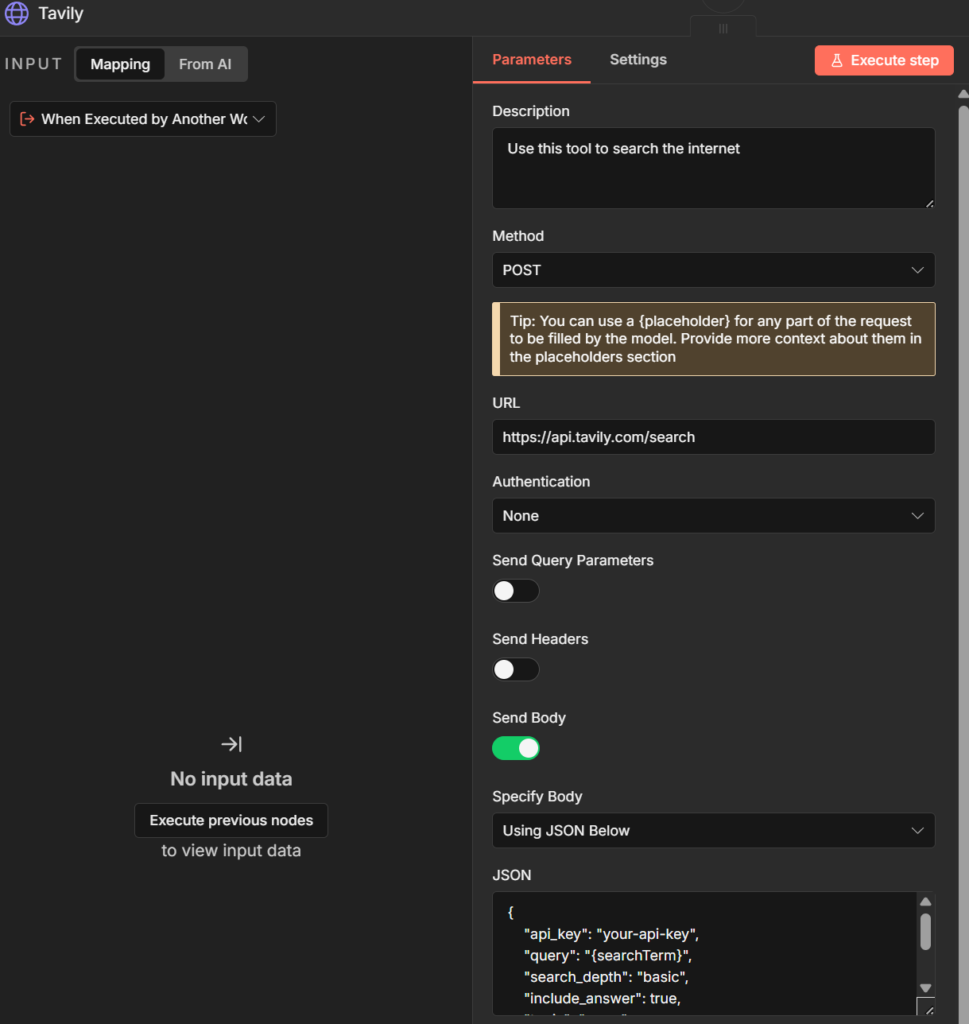
10-4. JSON Body 内の api_key を、Step 4で取得したTavily API Keyに置き換えます。
{
    "api_key": "your-tavily-api-key",
    "query": "{searchTerm}",
    ...
}システムプロンプトの確認:
10-5. Content Creator Agent ノードを開き、システムプロンプトを確認します。
# Overview
You are a skilled AI blog writer specializing in engaging,
well-structured, and informative content.
10-6.ワークフローを保存した後、公開(Publish)します。公開(Publish)しないと、親エージェントから子エージェントを呼び出した際に、情報が更新されていないので注意してください。
Step 11: 子エージェント以外のツールの設定
親エージェント(Ultimate Assistant)には、4つの子エージェントのほかに以下のツールも接続されています。
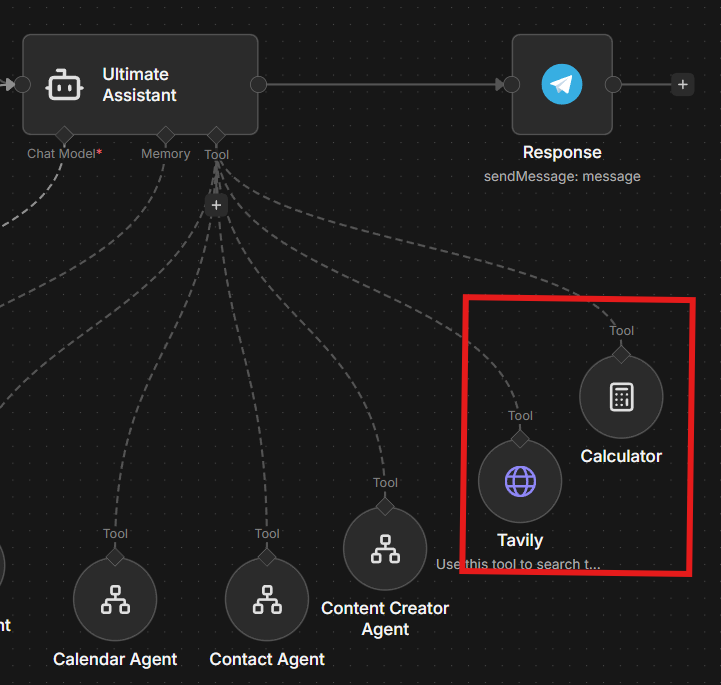
| ツール名 | 種類 | 役割 |
|---|---|---|
| Tavily | HTTP Requestノード | Tavily APIを使ったインターネット検索 |
| Calculator | 計算ツールノード | 数値計算(日付計算、金額計算など) |
Calculatorはインポート時に自動で配置されるため、追加の設定は不要です。Tavilyは HTTP Request ノードのため、API Keyの設定が必要です。
Tavily(HTTP Requestノード)の設定:
11-1. 親ワークフロー(Ultimate Personal Assistant)の Tavily ノードをダブルクリックして開きます。
11-2. 以下のパラメータを確認します。
| パラメータ | 値 |
|---|---|
| Description | Use this tool to search the internet |
| Method | POST |
| URL | https://api.tavily.com/search |
| Send Body | ON |
| Specify Body | Using JSON |
11-3. JSON Body 内の api_key を、Step 4で取得したTavily API Keyに置き換えま
{
    "api_key": "your-tavily-api-key",
    "query": "{searchTerm}",
    ...
}
{searchTerm} はプレースホルダーで、エージェントが検索クエリを自動的に挿入します。
11-4. ワークフローを保存した後、公開(Publish)します。公開(Publish)しないと、親エージェントから子エージェントを呼び出した際に、情報が更新されていないので注意してください。
Step 12: 全体動作確認
すべての設定が完了したら、動作確認を行います。
ワークフローの有効化:
12-1. 以下の順番でワークフローを Active にします。
- 🤖Email Agent
- 🤖Calendar Agent
- 🤖Contact Agent
- 🤖Content Creator Agent
- Ultimate Personal Assistant
テスト1: 連絡先の取得
12-2. Telegramで「〇〇さんのメールアドレスを教えて」と送信します。
12-3. Airtableに登録した連絡先情報が返ってくればOKです。
テスト2: メール送信
12-4. Telegramで「〇〇さんにテストメールを送って」と送信します。
12-5. Contact Agentで連絡先を取得 → Email Agentでメール送信、という流れで処理されます。
12-6. 送信済みメールを確認し、正しく送信されていればOKです。
テスト3: カレンダーイベント作成
12-7. Telegramで「明日の14時にミーティングを設定して」と送信します。
12-8. Googleカレンダーにイベントが作成されていればOKです。
テスト4: ブログ記事生成
12-9. Telegramで「〇〇についてのブログを書いて」と送信します。
12-10. Content Creator AgentがWeb検索を行い、HTML形式のブログ記事を生成します。
実行履歴の確認:
12-11. n8nの Executions を開き、各ワークフローの実行履歴を確認します。
12-12. 親エージェントから子エージェントへのタスク委譲が正しく行われているか確認します。
よくある質問
- 子エージェントを追加できますか?
-
はい、可能です。新しい子エージェントワークフローを作成し、親エージェントのツールとして追加すれば拡張できます。例えば、Slack通知エージェントやNotionエージェントなどを追加できます。
- LLMモデルは何がおすすめですか?
-
親エージェントにはGPT-4o-mini、子エージェント(Email / Calendar / Contact)にはGPT-4oがおすすめです。Content Creator AgentにはClaude 3.5 Sonnetを使うと、より自然な文章を生成できます。コストを抑えたい場合は、すべてGPT-4o-miniでも基本的な動作は可能です。
- API利用料金の目安は?
-
使用頻度によりますが、1日10〜20回程度の利用で月額$10〜$30程度が目安です。Gmail / Google CalendarのAPIは無料枠内で収まることが多いです。LLMのAPI料金が主なコストになります。
つまずきやすいポイント
- 連絡先が見つからない: Airtableのフィールド名(
name、email、phoneNumber)が正確に設定されているか確認してください。大文字小文字も区別されます。 - メール返信が別スレッドになる: Email Agentが返信する際は、まず
Get EmailsでメッセージIDを取得し、そのIDをEmail Replyに渡す必要があります。この流れはエージェントが自動で判断しますが、うまくいかない場合はシステムプロンプトを確認してください。 - エージェントがエラーを返す: 各エージェントの
onError設定がcontinueErrorOutputになっているか確認してください。これにより、エラー時もリトライメッセージが親エージェントに返されます。 - 子エージェントが呼び出されない: 親エージェントのツールノードで、正しい子エージェントワークフローが選択されているか確認してください。ワークフロー名ではなく、ワークフローIDで紐づいています。
なかなかうまくいかないときは?
「Gmail認証が失敗する」「エージェント間の連携がうまくいかない」「思った通りの返答が得られない」など、設定が複雑なため、うまくいかないケースもあるかもしれません。
そこで、おすすめしたいのが「ジドウカ」です。
ジドウカは、これまで合計800タスク以上の業務の自動化をしてきた実績のある法人専用の自動化サービスです。
業務の一部を”タスク単位”で自動化し、【月額1万円から】安定運用できるサブスクリプション型のサービスです。
技術のことが分からなくても「こういう作業をラクにしたい」と伝えるだけで自動化することが可能です。
「自分のやりたい自動化って本当に実現できるのかな…」という方には、
少額・短期間での「お試し開発」があるので、お気軽にご活用ください。
まとめ
前編・後編を通じて、以下のシステムを構築しました。
前編で構築した内容:
- Telegram Bot連携
- 音声・テキスト入力の処理
- 会話履歴の保持
後編で構築した内容:
- Gmail / Google Calendar / Airtable / Tavily / LLMの認証設定
- 4つの子エージェント(Email / Calendar / Contact / Content Creator)
- 子エージェントと親エージェントの接続
これで、Telegramから自然言語で指示を出すだけで、メール送信、カレンダー管理、連絡先操作、ブログ記事生成が自動で実行される「究極のパーソナルアシスタント」が完成しました。
カスタマイズのヒント:
- 署名やメール文体を変更する → Email Agentのシステムプロンプトを編集
- 新しいエージェントを追加する → 子エージェントワークフローを作成し、親エージェントのツールに追加
- 別のメッセンジャーに対応する → Telegram TriggerをSlack / LINE / Discordに置き換え
ぜひ自分の業務に合わせてカスタマイズし、さらに便利なアシスタントに育てていってください。